<?xml version="1.0" encoding="utf-8"?>
<feed xmlns="http://www.w3.org/2005/Atom">

  <title><![CDATA[Neutron Flux]]></title>
  <link href="http://rwc9u.github.io/atom.xml" rel="self"/>
  <link href="http://rwc9u.github.io/"/>
  <updated>2014-08-08T00:32:43-06:00</updated>
  <id>http://rwc9u.github.io/</id>
  <author>
    <name><![CDATA[Rob Christie]]></name>
    
  </author>
  <generator uri="http://octopress.org/">Octopress</generator>

  
  <entry>
    <title type="html"><![CDATA[Bower, Rails, and Javascript Components with CSS and Images]]></title>
    <link href="http://rwc9u.github.io/blog/2014/08/07/bower-rails-and-javascript-components-with-css-and-images/"/>
    <updated>2014-08-07T23:58:10-06:00</updated>
    <id>http://rwc9u.github.io/blog/2014/08/07/bower-rails-and-javascript-components-with-css-and-images</id>
    <content type="html"><![CDATA[<p>There are a number of good articles describing the setup of <a href="http://bower.io/">bower</a> with rails applications, but I was having a hard time finding a good description for how to integrate Bower, Rails, and javascript components that contain CSS and images. Specifically, I was trying to use bower to manage my applications dependency on <a href="http://ivaynberg.github.io/select2/">select2</a>.</p>

<h3>TL;DR;</h3>

<p>Use the <a href="https://github.com/42dev/bower-rails">bower-rails</a> gem.</p>

<!-- more -->


<p></p>

<p>It provides a number of nice rake tasks that help integrate the use of bower with a rails application and the asset pipeline. I prefer to stick with the bower.json configuration instead of the ruby-based DSL that bower-rails provides. I stick with the default bower location that stores assets in vendor/assets/bower_components. Make sure to add the following to your application.rb.</p>

<pre><code>config.assets.paths &lt;&lt;  Rails.root.join("vendor","assets","bower_components")
</code></pre>

<p>Once you have packages added to your bower.json, then you run the following:</p>

<pre><code>rake bower:install
</code></pre>

<p>to install your javascript packages. You then reference the javacript in your application.js and application.css files.</p>

<p>For javascript components that reference images within their CSS, you need some mechanism for updating the asset paths to be rails asset pipeline friendly. Bower-rails aids in fixing this issue with the provided rake task:</p>

<pre><code>rake bower:resolve 
</code></pre>

<p>It resolves relative asset paths in components by rewriting url references in component css files with the rails helper method to reference the asset in an asset pipeline friendly way. See <a href="https://github.com/42dev/bower-rails/blob/master/lib/bower-rails/performer.rb#L118">BowerRails::Performer#resolve_asset_paths</a> for more detail.</p>

<p>My preference is to check in all of the bower_components into our repository, so we run bower:install followed by bower:resolve. You then need to add the images referenced within the package to your config.assets.precompile list for your staging and production environments. For example here is the setup for adding the <a href="http://ivaynberg.github.io/select2/">select2</a> javascript component to your rails project using bower and rails.</p>

<p>bower.json:</p>

<pre><code>{
    "name": "Acme",
    "private": true,
    "dependencies": {
        "select2": "3.5.1"
    }
}
</code></pre>

<p>app/assets/javascripts/application.js.coffee:</p>

<pre><code>#= require select2/select2
</code></pre>

<p>app/assets/stylesheets/application.css.sass</p>

<pre><code>//= require select2/select2
</code></pre>

<p>config/environments/staging.rb and config/environments/production.rb:</p>

<pre><code>config.assets.precompile += ["select2/*.png",
                            "select2/*.gif"]
</code></pre>

<p>It&rsquo;s not perfect, but it gives you the dependency management of your javascript components, and it&rsquo;s better then trying to figure out what gems you need to pull in to get the desired javascript component enabled for the asset pipeline.</p>
]]></content>
  </entry>
  
  <entry>
    <title type="html"><![CDATA[Migrations Without a Restart on Heroku]]></title>
    <link href="http://rwc9u.github.io/blog/2012/06/19/migrations-without-a-restart-on-heroku/"/>
    <updated>2012-06-19T02:02:00-06:00</updated>
    <id>http://rwc9u.github.io/blog/2012/06/19/migrations-without-a-restart-on-heroku</id>
    <content type="html"><![CDATA[<p>I ran into a situation today where I had 10 long running background processes that were getting bogged down because we were missing an index. The app is running on Heroku on a shared database, so I don’t have the luxury of using psql to add the needed index. However, I wanted to figure out a way to add the index without restarting the long-running processes.</p>

<!-- more -->


<p></p>

<p>My solution was to log in via the console, and create the migration by
hand.</p>

<div><script src='https://gist.github.com/2952889.js?file=gistfile1.rb'></script>
<noscript><pre><code>heroku run console --app &lt;your app name&gt;

irb(main):002:0* class AddIndexToSearches &lt; ActiveRecord::Migration
irb(main):003:1&gt;   def change
irb(main):004:2&gt;     add_index :searches, :search_string, :quiet =&gt; true
irb(main):005:2&gt;   end
irb(main):006:1&gt; end
=&gt; nil
irb(main):007:0&gt; t = AddIndexToSearches.new
=&gt; #&lt;AddIndexToSearches:0x00000006a240a8 @name=&quot;AddIndexToSearches&quot;, @version=nil, @connection=nil&gt;
irb(main):008:0&gt; t.change
-- add_index(:searches, :search_string)
   (91.8ms)   SELECT distinct i.relname, d.indisunique, d.indkey, t.oid
 FROM pg_class t
 INNER JOIN pg_index d ON t.oid = d.indrelid
 INNER JOIN pg_class i ON d.indexrelid = i.oid
 WHERE i.relkind = &#39;i&#39;
 AND d.indisprimary = &#39;f&#39;
 AND t.relname = &#39;searches&#39;
 AND i.relnamespace IN (SELECT oid FROM pg_namespace WHERE nspname = ANY (current_schemas(false)) )
 ORDER BY i.relname


   (207509.6ms)  CREATE INDEX &quot;index_searches_on_search_string&quot; ON &quot;searches&quot; (&quot;search_string&quot;)
   -&gt; 207.6028s
=&gt; #&lt;PGresult:0x00000006c81328&gt;
irb(main):009:0&gt; 
irb(main):010:0* 
</code></pre></noscript></div>


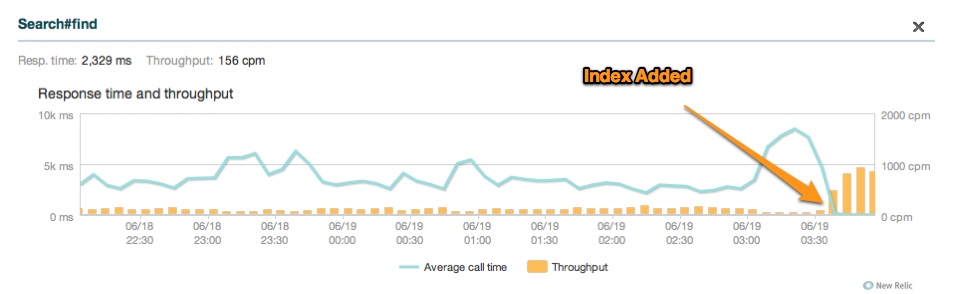
<p>Once complete, I added a new migration within the source code that has the option :quiet => true (_updated: see note below), so that all environments/developers get the manually created index that resides in production. Had I just done a git push to heroku, the background processes would have restarted. The results of adding the needed index can be seen in our New Relic stats below:</p>

<p><img src="http://rwc9u.github.io/images/new_relic_throughput.jpg" title="[New Relic Stats [New Relic Stats After Index Added]]" ></p>

<p>Note: I thought :quiet was a valid option for add_index, but it is actually a patch that you will need to add for your specific database. The following article describes a <a href="http://grosser.it/2009/06/06/add_index-and-remove_index-now-quiet-on-duplicate-index/">patch for MySQL</a>. See mine for PostGreSQL.</p>

<div><script src='https://gist.github.com/2952889.js?file=add_index_patch.rb'></script>
<noscript><pre><code>module ActiveRecord::ConnectionAdapters::SchemaStatements

  def add_index_with_quiet(table_name, column_names, options = {})
    quiet = options.delete(:quiet)
    add_index_without_quiet table_name, column_names, options
  rescue
    raise unless quiet and $!.message =~ /^Index name &#39;.*&#39; on table &#39;#{table_name}&#39; already exists/i
    puts &quot;Failed to create index #{table_name} #{column_names.inspect} #{options.inspect}&quot;
  end
  alias_method_chain :add_index, :quiet

end
</code></pre></noscript></div>


]]></content>
  </entry>
  
  <entry>
    <title type="html"><![CDATA[Accepts Nested Attributes with Polymorphic Associations and a Custom Autosave]]></title>
    <link href="http://rwc9u.github.io/blog/2011/07/07/eye-street-accepts-nested-attributes-for-with/"/>
    <updated>2011-07-07T08:11:24-06:00</updated>
    <id>http://rwc9u.github.io/blog/2011/07/07/eye-street-accepts-nested-attributes-for-with</id>
    <content type="html"><![CDATA[<p>Edit: This was originally posted on
<a href="http://blog.eyestreet.com/post/7309604903/accepts-nested-attributes-for-with-polymorphic">my companies blog</a>.</p>

<p>Wheew… what a title… kinda dry, very geeky, but if you landed here, hopefully this will help. This blog documents some of the code wrangling that we did for a recent app, VRCompliance. I needed to have the ability to create multiple phone numbers when inputting either addresses or people in our system. It seemed like a great time to use models with with the :accepts_nested_attributes_for :nested_model declaration. When doing this I found out that the default creation of a nested object was not what I wanted. Essentially, I wanted  a find_or_create for the nested object. After some searching I came across this StackOverflow article that describes a solution. This post adds to the discussed solution by going into additional detail and fleshing out the answer described in the previous link.</p>

<!-- more -->


<p></p>

<p>For this post I’ve simplified our objects so our sample application has people, addresses, and phone numbers. Both a person and an address can have many phone numbers. Additionally, with our application’s data it is possible to have a many-to-many relationship between the phone numbers, people and addresses. Instead of using two separate join tables to describe these relationships, I went with a polymorphic association, calling our resulting common join table, phonings, and the polymorphic relations a phonable.</p>

<p>Our  models look similar to the snippets below:</p>

<div><script src='https://gist.github.com/1038766.js?file=address.rb'></script>
<noscript><pre><code>class Address &lt; ActiveRecord::Base
  has_many :phonings, :as =&gt; :phonable
  has_many :phone_numbers, :through =&gt; :phonings

  accepts_nested_attributes_for :phonings, :allow_destroy =&gt; true

end
</code></pre></noscript></div>


<div><script src='https://gist.github.com/1038766.js?file=person.rb'></script>
<noscript><pre><code>class Person &lt; ActiveRecord::Base
  has_many :phonings, :as =&gt; :phonable
  has_many :phone_numbers, :through =&gt; :phonings
end</code></pre></noscript></div>


<div><script src='https://gist.github.com/1038766.js?file=phone_number.rb'></script>
<noscript><pre><code>class PhoneNumber &lt; ActiveRecord::Base
  has_many :phonings, :dependent =&gt; :destroy
  has_many :addresses, :through =&gt; :phonings, :source =&gt; :phonable, :source_type =&gt; &quot;Address&quot;
  has_many :people, :through =&gt; :phonings, :source =&gt; :phonable, :source_type =&gt; &quot;Person&quot;
end
</code></pre></noscript></div>


<p>And the initial phoning model was:</p>

<div><script src='https://gist.github.com/1038766.js?file=phoning_original.rb'></script>
<noscript><pre><code>class Phoning &lt; ActiveRecord::Base
  belongs_to :phone_number, :autosave =&gt; true
  belongs_to :phonable, :polymorphic =&gt; true

  accepts_nested_attributes_for :phone_number
end
</code></pre></noscript></div>


<p>With the models and their relationships defined, I built the forms for creating an address, and wanted to nest the creation of the phone numbers within the forms for the creating of both a person and address. Initially, I think I had  :accepts_nested_attributes_for :phone_numbers in the address object, but there were issues with that approach.</p>

<p>First, deletion of the phone number deleted the object, and second, if I added the phone number to two different objects then I would get validation errors due to uniqueness constraints that I have on our real phone number object.  After digging around, I found some links that discussed making the nested attributes for the join table so that on deletion you are really deleting the join object and not the object it relates. This resulted in :accepts_nested_attributes_for :phonings in the address object (as seen above).</p>

<p>Deleting of an object no longer deleted my phone number object, just
the phoning object. However, I still had the issue that if the same
phone number was added to two addresses via nested attributes then two
distinct phone number objects were created. The test below shows
passing tests that document this issue. Two addresses are initialized
and saved with the same nested phone number. After saving both, we
find that we have two phone number objects with the same phone number.</p>

<div><script src='https://gist.github.com/1038766.js?file=address_test.rb'></script>
<noscript><pre><code>  test &quot;By default adding the same phone number will create a new phone number row when adding a second phone number&quot; do
    a = Address.new(default_address(
                                    &quot;phonings_attributes&quot;=&gt;
                                    {&quot;1289233155995&quot;=&gt;
                                      {&quot;phone_number_attributes&quot;=&gt;
                                        {&quot;phone_number&quot;=&gt;&quot;17032221234&quot;},
                                        &quot;_destroy&quot;=&gt;&quot;false&quot;}
                                    }
                                    ))
    a.save!
    assert_equal &quot;Cville&quot;, Address.find(a.id).city
    assert_equal &quot;17032221234&quot;, Address.find(a.id).phone_numbers.first.phone_number
    b = Address.new(default_address(:address1 =&gt; &quot;234 Test&quot;,
                                    &quot;phonings_attributes&quot;=&gt;
                                    {&quot;1289233155995&quot;=&gt;
                                      {&quot;phone_number_attributes&quot;=&gt;
                                        {&quot;phone_number&quot;=&gt;&quot;17032221234&quot;},
                                        &quot;_destroy&quot;=&gt;&quot;false&quot;}
                                    }
                                    ))
    b.save!
    assert_equal &quot;Cville&quot;, Address.find(b.id).city
    assert_equal &quot;17032221234&quot;, Address.find(b.id).phone_numbers.first.phone_number
    assert_equal @original_phone_number_count + 2, PhoneNumber.count
    assert_equal 2, PhoneNumber.where(:phone_number =&gt; &quot;17032221234&quot;).count
  end
</code></pre></noscript></div>


<p>Based on the StackOverflow thread from above, I realized that I needed to change the autosave creation of phone numbers. It should be noted that accepts_nested_attributes_for automatically sets :autosave for the model. Autosave means that associated records are automatically saved when the parent object is saved. In our examples this means that when an Address object is saved the Phoning object and the PhoneNumber object are saved. The default functionality is to create a new object. The gist below shows the necessary changes to our test to generate the desired functionality of the find or create for the nested phone numbers.</p>

<div><script src='https://gist.github.com/1038766.js?file=address_test_2.rb'></script>
<noscript><pre><code>  test &quot;When you override the autosave associated for the join table then you can point multiple addresses at the same phone number object.&quot; do

    # overriding autosave_associated_records_for_phone_numbers
    Phoning.send :define_method, :autosave_associated_records_for_phone_number do
      if new_phone_number = PhoneNumber.where(:phone_number =&gt;  phone_number.phone_number).first then
           self.phone_number = new_phone_number
      else
        self.phone_number.save!
        self.phone_number_id = self.phone_number.id
      end
    end

    a = Address.new(default_address(
                                    &quot;phonings_attributes&quot;=&gt;
                                    {&quot;1289233155995&quot;=&gt;
                                      {&quot;phone_number_attributes&quot;=&gt;
                                        {&quot;phone_number&quot;=&gt;&quot;17032221234&quot;},
                                        &quot;_destroy&quot;=&gt;&quot;false&quot;}
                                    }
                                    ))
    a.save!
    assert_equal &quot;Cville&quot;, Address.find(a.id).city
    assert_equal &quot;17032221234&quot;, Address.find(a.id).phone_numbers.first.phone_number
    b = Address.new(default_address(:address1 =&gt; &quot;234 Test&quot;,
                                    &quot;phonings_attributes&quot;=&gt;
                                    {&quot;1289233155995&quot;=&gt;
                                      {&quot;phone_number_attributes&quot;=&gt;
                                        {&quot;phone_number&quot;=&gt;&quot;17032221234&quot;},
                                        &quot;_destroy&quot;=&gt;&quot;false&quot;}
                                    }
                                    ))
    b.save!
    assert_equal &quot;Cville&quot;, Address.find(b.id).city
    assert_equal &quot;17032221234&quot;, Address.find(b.id).phone_numbers.first.phone_number
    assert_equal 3, PhoneNumber.count
    assert_equal 1, PhoneNumber.where(:phone_number =&gt; &quot;17032221234&quot;).count
  end</code></pre></noscript></div>


<p>We can then move that functionality back in to our model:</p>

<div><script src='https://gist.github.com/1038766.js?file=phoning.rb'></script>
<noscript><pre><code>class Phoning &lt; ActiveRecord::Base
  belongs_to :phone_number, :autosave =&gt; true
  belongs_to :phonable, :polymorphic =&gt; true

  accepts_nested_attributes_for :phone_number

  def autosave_associated_records_for_phone_number
    if new_phone_number = PhoneNumber.where(:phone_number =&gt; phone_number.phone_number).first then
      self.phone_number = new_phone_number
    else
      self.phone_number.save!
      self.phone_number_id = self.phone_number.id
    end
  end
end
</code></pre></noscript></div>


<p>In a future post, I will walk through the view and controllers used for these nested forms.</p>
]]></content>
  </entry>
  
  <entry>
    <title type="html"><![CDATA[Emacs Configuration]]></title>
    <link href="http://rwc9u.github.io/blog/2011/04/19/emacs-configuration/"/>
    <updated>2011-04-19T23:55:00-06:00</updated>
    <id>http://rwc9u.github.io/blog/2011/04/19/emacs-configuration</id>
    <content type="html"><![CDATA[<p>I’ve had my emacs configuration under version control for the better part of the last decade, cvs then svn, and for the last 3 years git. I finally bit the bullet, and purged it of private data. Since I doubt the history is that interesting to most people, I kept a local historical branch, and then truncated the master branch which is now available in my  github repos.</p>

<p>I used to use a monolithic .emacs file. When I declared .emacs bankruptcy a few years ago, I followed @rmm5t’s and @defunkt’s conventions… albeit probably not as nicely.</p>
]]></content>
  </entry>
  
  <entry>
    <title type="html"><![CDATA[Forcing :before_validations to run and save the updated data]]></title>
    <link href="http://rwc9u.github.io/blog/2010/12/17/forcing-before-validations-to-run-and-save-the-updated/"/>
    <updated>2010-12-17T10:44:17-07:00</updated>
    <id>http://rwc9u.github.io/blog/2010/12/17/forcing-before-validations-to-run-and-save-the-updated</id>
    <content type="html"><![CDATA[<p>I meant to write this up awhile ago, but just want to get it out… Have you ever decided to massage incoming data in a :before_validation. I ran into an issue recently where I added a change to a before_validation to remove extraneous characters from phone numbers. I already had a ton of numbers in the system, so I thought I would then be able to just iteration through the list of phone numbers and resave them, and voila… my data would be updated and I could then enable additional validation checks.</p>

<!-- more -->


<p>Nothing happened. After a bit of digging I realized that Rails was assuming that nothing was changing because the new phone number value was the same as the old value so no save was occurring and validations (and before_validation hooks) were not being run. Turning off partial updates temporarily in the console allowed me to resave my data and have the new before_validation hook massage my data.</p>

<div><script src='https://gist.github.com/745337.js'></script>
<noscript><pre><code># added a new before_validation

PhoneNumber.all { |p| p.save! }

# doesn&#39;t resave the data... silly me

ActiveRecord::Base.partial_updates = false

PhoneNumber.all { |p| p.valid?; p.save! }

# now we are talking</code></pre></noscript></div>


]]></content>
  </entry>
  
  <entry>
    <title type="html"><![CDATA[Shoulda Snippets For Emacs]]></title>
    <link href="http://rwc9u.github.io/blog/2009/07/27/shoulda-snippets-for-emacs/"/>
    <updated>2009-07-27T22:00:00-06:00</updated>
    <id>http://rwc9u.github.io/blog/2009/07/27/shoulda-snippets-for-emacs</id>
    <content type="html"><![CDATA[<p>I have just updated my Shoulda snippets for the Emacs YASnippets templating package. Shoulda is a ruby-based testing framework that consists of test macros, assertions, and helpers added on to the Test::Unit ruby framework. The snippets are based, and in many cases copied from the TextMate Shoulda snippet bundle, and modified where needed to work with the YASnippets package. New features in the recently released 0.6beta of YASnippet allow support for more of the TextMate-based snippets. The new YASnippet functionality is discussed in more detail in a post I did on Emacs Blog.</p>

<p>In order to port many of the snippets over from the TextMate bundle I wrote a script that automates the process. There is a Python script that does something very similar. The writing of my script was more of just a code kata for me, so take a look at both. One may be more suitable for your needs.</p>
]]></content>
  </entry>
  
  <entry>
    <title type="html"><![CDATA[Better Oracle Support For db:structure:dump]]></title>
    <link href="http://rwc9u.github.io/blog/2009/02/22/better-oracle-support-for-db-structure-dump/"/>
    <updated>2009-02-22T22:00:00-07:00</updated>
    <id>http://rwc9u.github.io/blog/2009/02/22/better-oracle-support-for-db-structure-dump</id>
    <content type="html"><![CDATA[<p>If you have tried</p>

<figure class='code'><div class="highlight"><table><tr><td class="gutter"><pre class="line-numbers"><span class='line-number'>1</span>
</pre></td><td class='code'><pre><code class='ruby'><span class='line'><span class="err">$</span> <span class="n">rake</span> <span class="ss">db</span><span class="p">:</span><span class="ss">structure</span><span class="p">:</span><span class="n">dump</span>
</span></code></pre></td></tr></table></div></figure>


<p>in a rails app when using Oracle as your database, then you have probably been slightly disappointed. The same rake task for MySQL and Postgres dumps everything you need to recreate the database. The task for Oracle only dumps SQL for the table creation (no constraints), and for the sequences. The <a href="http://github.com/eyestreet/active_record_oracle_extensions/tree/master">active_record_oracle_extensions</a> plug now supports dumping sql for the following:</p>

<ul>
<li>primary keys</li>
<li>indexes</li>
<li>foreign keys</li>
<li>synonyms</li>
</ul>


<p>I have added enough functionality to scratch my itch. If you need something else or find a bug let me know.</p>
]]></content>
  </entry>
  
  <entry>
    <title type="html"><![CDATA[Active Record Oracle Extensions Plugin]]></title>
    <link href="http://rwc9u.github.io/blog/2009/01/01/active-record-oracle-extensions-plugin/"/>
    <updated>2009-01-01T22:00:00-07:00</updated>
    <id>http://rwc9u.github.io/blog/2009/01/01/active-record-oracle-extensions-plugin</id>
    <content type="html"><![CDATA[<p><strong>NOTE:</strong> This post is OBE. Check out the active record oracle
adapter. Most/all changes have been added to it.</p>

<p>The <a href="http://github.com/eyestreet/active_record_oracle_extensions/tree/master">active_record_oracle_extensions plugin</a> provides support for adding foreign keys to migrations, adding synonyms to migrations, and disabling foreign key constraints during fixture loading. These are features that I needed in my applications, but either did not exist in other plugins, or the plugins seem to have been abandoned.</p>

<!-- more -->


<figure class='code'><figcaption><span>Installing into a Rails app </span></figcaption>
<div class="highlight"><table><tr><td class="gutter"><pre class="line-numbers"><span class='line-number'>1</span>
</pre></td><td class='code'><pre><code class='console'><span class='line'><span class="gp">$</span> script/plugin install git://github.com/eyestreet/active_record_oracle_extensions.git
</span></code></pre></td></tr></table></div></figure>


<h2>Adding Foreign Keys In a Migration</h2>

<p>The example below shows a snippet from a migration that adds a foreign key.</p>

<figure class='code'><div class="highlight"><table><tr><td class="gutter"><pre class="line-numbers"><span class='line-number'>1</span>
<span class='line-number'>2</span>
<span class='line-number'>3</span>
<span class='line-number'>4</span>
<span class='line-number'>5</span>
<span class='line-number'>6</span>
<span class='line-number'>7</span>
<span class='line-number'>8</span>
<span class='line-number'>9</span>
<span class='line-number'>10</span>
<span class='line-number'>11</span>
<span class='line-number'>12</span>
</pre></td><td class='code'><pre><code class='ruby'><span class='line'><span class="k">def</span> <span class="nc">self</span><span class="o">.</span><span class="nf">up</span>
</span><span class='line'>    <span class="n">create_table</span> <span class="ss">:assets</span><span class="p">,</span> <span class="ss">:force</span> <span class="o">=&gt;</span> <span class="kp">true</span> <span class="k">do</span> <span class="o">|</span><span class="n">t</span><span class="o">|</span>
</span><span class='line'>      <span class="n">t</span><span class="o">.</span><span class="n">integer</span> <span class="ss">:media_record_id</span>
</span><span class='line'>      <span class="n">t</span><span class="o">.</span><span class="n">string</span>  <span class="ss">:media_file_name</span>
</span><span class='line'>      <span class="n">t</span><span class="o">.</span><span class="n">string</span>  <span class="ss">:media_content_type</span>
</span><span class='line'>      <span class="n">t</span><span class="o">.</span><span class="n">integer</span> <span class="ss">:media_file_size</span>
</span><span class='line'>      <span class="n">t</span><span class="o">.</span><span class="n">datetime</span> <span class="ss">:media_updated_at</span>
</span><span class='line'>      <span class="n">t</span><span class="o">.</span><span class="n">timestamps</span>
</span><span class='line'>    <span class="k">end</span>
</span><span class='line'>    <span class="n">add_foreign_key_constraint</span> <span class="ss">:assets</span><span class="p">,</span> <span class="ss">:media_record_id</span><span class="p">,</span>
</span><span class='line'>                                        <span class="ss">:media_records</span><span class="p">,</span> <span class="ss">:id</span>
</span><span class='line'> <span class="k">end</span>
</span></code></pre></td></tr></table></div></figure>


<h2>Adding a Synonym in Migration</h2>

<p>The example below shows the creation of a synonym named events for other_user.events. The force option adds “or replace” to the sql that generates the synonym. It is assumed that the user under which your are creating the synonym already has the needed grants to allow the creation of the synonym on other_user.</p>

<figure class='code'><div class="highlight"><table><tr><td class="gutter"><pre class="line-numbers"><span class='line-number'>1</span>
</pre></td><td class='code'><pre><code class='ruby'><span class='line'><span class="n">add_synonym</span> <span class="ss">:events</span><span class="p">,</span> <span class="ss">:other_user</span><span class="p">,</span> <span class="ss">:events</span><span class="p">,</span> <span class="ss">:force</span> <span class="o">=&gt;</span> <span class="kp">true</span>
</span></code></pre></td></tr></table></div></figure>


<h2>Disabling Constraints During Fixture Loading</h2>

<p>If you are using sys or system as your user for your rails application, then do not use this plugin, or use it at your own risk. During fixture loading, this plugin disables constraints for the user that has established the connection to oracle, and then re-enables the constraints after the load.</p>
]]></content>
  </entry>
  
</feed>